The App & Tech
Why won't the app work on my computer?+
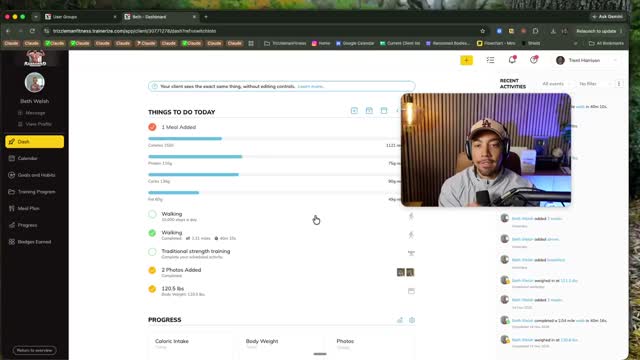
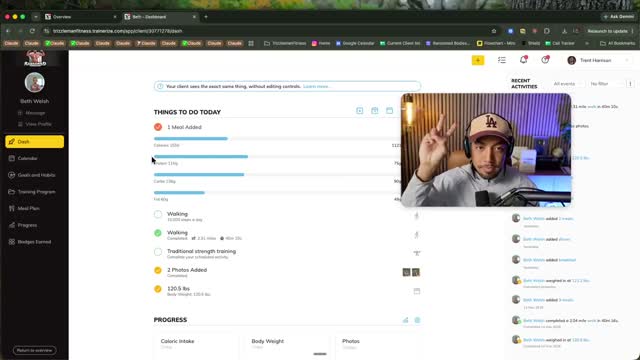
The desktop version of Trainerize is view-only. You can read your meal plan and review workouts there, but logging food, weigh-ins, photos, and messaging all happen in the MOBILE APP on your phone. We recommend you primarily use your phone to access the app. In the app store, search "Trainerize" and sign in with the email you used when you signed up.
Who am I messaging? It says your name.+
My icon is the front door to the whole coaching team — we all share that account so you always have a real person, fast. We are hands-on, no AI communication. Your coach signs every message with their name (like "-Mike" or "-Hannah" or "-Kelsey") so you always know who you're talking to. If you want a specific coach, just start your message with their name and it lands directly with them.
What is the Ransomed Bodies Skool? Is that different from the app?+
The Skool is your resource library — every cookbook, every training video, the Start Here section, fast food guides, all of it. The app is where the daily work happens. Nobody messages in the Skool. When your coach wants you to watch something specific, they'll send it straight to you in the app so you never have to go hunting.
My watch won't sync with the app. What do I do?+
First, try deleting and re-downloading the app — Apple has been glitchy lately and this fixes it most of the time. You won't lose any data. If it still won't connect, message us in the app and we'll walk you through it. No watch? No problem. Your movement goal works without one.
I don't see the "log food" button anywhere.+
You're probably on desktop. Open the app on your phone, tap the + button, and you can log any meal. If it's a meal you eat often, save it as a favorite so next time it's one tap.
What does the "T" in the box next to my workout mean?+
That's just the general exercise logging toggle — you can ignore it. Your actual workout logging happens when you open the workout itself.
Your Meal Plan
My meal plan says Day A, Day B, Day C. Is that only three days of food?+
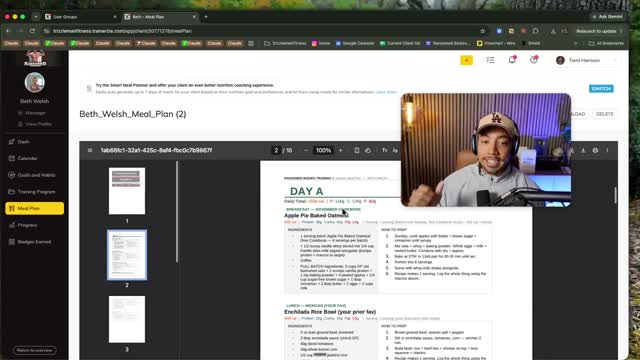
Nope, it's a full week. The rotation is A, B, C, then repeat: A, B, C again, and the last day you pick your favorite. You can use the meals interchangeably. So if you love one breakfast, for example, you can eat that breakfast every day if you'd like. The grocery list at the bottom of the plan batches everything you need for the whole rotation.
Do I have to eat exactly what's on the plan?+
The meal plan is a guide, not a rulebook. Swap anything you want as long as it fits your calories and protein — different brands, different vegetables, whatever your store carries. Your coach checks two numbers: calories and protein. Hit those, and you're on track.
The recipes say to double them. Why?+
Doubling the recipe is how you prep the full rotation in one session — cook once, freeze the rest, and rotate through the week without cooking every night. If you're cooking for a family, scale it up to feed everyone the same meal. One batch, one table.
Can I swap out foods I don't like?+
Absolutely. Hate turkey bacon? Don't eat turkey bacon. There's an alternatives list at the bottom of your meal plan, every cookbook in the Skool is fair game, and if you see a recipe online, screenshot it and send it to your coach — we'll rebuild it into your plan. If whole meals aren't working, say so. We'll send you a brand new plan.
How do I get a new meal plan?+
Three ways. Ask in the app anytime, check the meal plan box on your weekly check-in form, or your coach will offer one whenever your calories or macros change. New plans land on Wednesdays so you have the rest of the week to shop and prep.
What about coffee, creamer, soda, and my little treats?+
Log what actually has calories. Black coffee is basically free — don't bother. Creamer, sugar, half and half: track it. Coke Zero and Diet Coke both fine (no need to track this). Your one or two lollipops a week? Track it and move on. Nothing is banned. Everything is tracked.
What if I go out to eat or I'm traveling?+
Send us the menu with enough notice and we'll tell you exactly what to order. Traveling? Tell us a week out and we'll send you a full travel and restaurant resource pack. Going on a cruise, to a wedding, on vacation — tell us, and you'll walk in with a plan instead of guesswork.
My grocery budget or schedule is weird this month. What do I do?+
Tell your coach. We rebuild meal plans around what you actually have in the house, what your stores carry, and how often you shop. Paid once a month? We build around that. This is custom for a reason — use it.
Weigh-Ins, Photos & Your Data
How often do I weigh in?+
Daily, first thing in the morning, on an empty stomach, after the bathroom. That's your lightest, most accurate number. So what we do is take your AVERAGE weekly weigh-ins rather than judging one number. Your weight fluctuates every single day — that's water, food, life, not fat. The trend is what matters, and your coach reads the trend, not any single day.
The scale went UP. Did I do something wrong?+
Almost certainly not. Early on, your body goes through an adaptation period — eating more protein and more food than usual can add water weight for a couple of weeks before the scale moves down. That's normal and expected. This is exactly why we also take weekly photos: if the scale stalls but your photos and clothes are changing, the program is working.
How do progress photos work?+
Weekly, ideally on Mondays, first thing in the morning. Front, side, and back, in similar clothing, same spot, same lighting. Pro tip from me: record a short video of yourself (selfie style with your phone propped up) rotating through the three angles, then SCREENSHOT the video in each position. Way easier than fumbling with the timer!
Do I log my vitamins and supplements?+
Nope! Skip the vitamins, minerals, and most supplements entirely — they don't meaningfully move your numbers. Creatine is the one exception some members track. Track protein powder too. When in doubt, ask your coach, but don't let supplements stress you out.
What is "track body stats" on my dashboard?+
That just means your weigh-in. Step on the scale, log the number, done.
What if I miss a check-in or fall off for a few days?+
Message us and keep going. Missing days happens — life happens. What matters is that you don't disappear on us. If we don't hear from you, we're reaching out to you anyway. We will be watching your dashboard at all times. No news is good news, and bad news gets handled fast.
Workouts & Training
Where do I find my workouts?+
In the app, tap the kettlebell icon on your dashboard. Your full training program is built in there, exercise by exercise, with video demonstrations for every movement.
An exercise hurts or I don't have the equipment. What do I do?+
Look for the little arrows next to any exercise — tap them and you'll get a built-in list of alternative movements we programmed for you. If none of those work, send us a message (a video of you doing the movement helps even more) and we'll swap it out or rebuild that day entirely. Bad knees, bad back, no bench, home-only equipment — tell us and we program around it. That's what custom means.
Do I need a gym? What equipment do I need?+
Your program is built for what you told us you have. If that's changed — new equipment, gym access, or you realized the plan calls for something you don't own — send us your equipment list and we'll adjust the program. Lots of members train entirely at home with dumbbells and bands.
What does the 45-minute walk task mean? Do I really have to walk 45 minutes straight?+
No. It's a movement goal, not a sentence. Break it up — 10 minutes here, 15 there. Walk the dog, take the stairs, chase your kids around. If you have a watch or step tracker, your coach can swap the walk task for a step goal instead. The point is more movement in your day, however it fits your life.
How often does my workout program change?+
Your program updates every four weeks, and we adjust it any time you give feedback. Sore, hurting, bored, progressing fast — say so on your check-in and we'll check it for you.
Can I keep going to my classes — Burn, Orange Theory, Pilates, Jazzercise?+
In most cases, yes — we build around what you love. Tell us what classes you take and how often, and we'll fit your program around them so you're not doubling up on the same muscle groups. We will tell you exactly how to blend them.
Communication, Check-Ins & What to Expect
What does the weekly rhythm look like?+
Here's your week at a glance: Saturday morning, your check-in form arrives in the app. Fill it out by Monday at noon Pacific. Your coach reviews everything and sends you a personal video by Tuesday night. If you requested a new meal plan, it lands on Wednesday. Once a month, you and your coach hop on a one-to-one call to recap, goal-set, and game plan the next 30 days.
When do I get my check-in form and when is it due?+
It arrives every Saturday around 8 a.m. Pacific in the app messenger. You have Saturday, Sunday, and Monday until noon Pacific to submit. Pro tip from the coaches: pretend it's due Sunday. The members who do that never miss one.
What happens on the team calls?+
Two chances a week, same topic both times: Wednesdays at 5 p.m. Pacific and Fridays at 8 a.m. Pacific. Q&As, trainings, and community. Not mandatory, camera optional (most members keep theirs off), and every call is recorded and sent out on Saturdays.
How fast will my coach respond?+
Usually within a few hours during the day. Sundays are the team's day off, so a Saturday-night message gets answered Monday morning.
What if I'm overwhelmed and have more questions than fit in one call?+
Message us in the app and say you'd like a second kickoff call. We'll send you the calendar and get you booked.
Who do I contact about what?+
Anything program-related — food, workouts, schedule, travel, injuries, motivation — goes to your coach in the app messenger. It all starts with tapping my head. Your coach answers or I'll answer.
Your Program & What's Next
When do I officially start?+
Your start date is set in the app and shows on your dashboard calendar. If life got crazy between signing up and your kickoff call, tell your coach — we can shift your start date so week one starts clean instead of half-committed. A clean week one beats a messy day one every time.
What should I do in my first week?+
Watch the five videos on this page. Get the app on your phone. Log your food, even imperfectly. Step on the scale daily. Take your photos Monday. That's it. You don't need to be perfect — you need to be present. The data you give us in week one is what we build week two from.
How fast will I see results?+
Every body responds on its own timeline. Some members see movement in the first week; for others it takes 60 days before the scale catches up to what the photos already show. Your job is the data: weigh-ins, photos, logged meals. Our job is reading that data and adjusting until the results come. Give us the data, we give you the results.
What happens when my program ends?+
We have members that have been on the program for over 5 years, and we have some people who just do 6 months. It all depends on what you need and your specific goals. People stay long term because they love the accountability, the support, and the community. We continue to set new goals because reaching your goal weight is not the destination. You'll have options, and we'll walk you through them before your term ends — from continuing one-on-one coaching, to a lighter check-in tier, to keeping app access with periodic support.
What if I want to quit?+
Then talk to us first. Roadblocks, plateaus, life chaos — we pivot, we adjust, we re-plan. Quitting is not an option we'll let you take quietly. We will keep fighting for you and with you as long as it takes to help you get the goals you signed up for.